3D Printing for Beginners Planner: Your All-in-One Launchpad for Creative Confidence
Starting a new skill—especially one as hands-on and fast-moving as 3D printing—can feel overwhelming. You’ve got the printer humming, filament loaded, and slicing software open… but then what? Where do you track your first calibration tests? How do you compare layer heights across different PLA brands? What’s the best way to log failed prints without losing momentum—or motivation?
That’s where the 3d Printing for Beginners Planner steps in—not as another tutorial or YouTube playlist, but as your quiet, reliable co-pilot. It’s built for action, not just inspiration.
Designed for Real Workflows—Not Just Theory
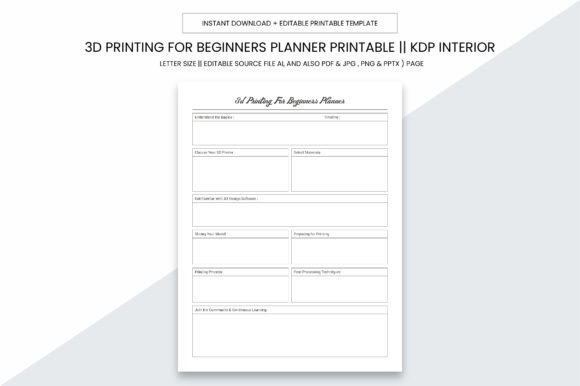
This isn’t a generic notebook disguised as a planner. Every page serves a purpose rooted in how beginners actually learn and iterate. Think about your typical week: maybe you’re printing a custom phone stand on Tuesday, calibrating your Ender 3 on Thursday, and troubleshooting stringing over the weekend. The 3d Printing for Beginners Planner meets you there—with dedicated sections for:
- Printer Setup Logs — Record firmware versions, belt tension readings, bed leveling sequences, and thermal runaway settings.
- Material Testing Grids — Compare nozzle temps, bed temps, flow rates, and retraction settings side-by-side for PETG vs. TPU vs. ABS.
- Print Failure Diaries — Note symptoms (warping, under-extrusion, ghosting), likely causes, and fixes tried—not just “failed.”
- Project Roadmaps — Break down multi-step builds like a robotic arm or modular enclosure with deadlines, tools needed, and design file versions.
It’s structured enough to eliminate guesswork—but flexible enough to adapt whether you're tinkering solo in your garage, teaching a high school makerspace, or launching a small KDP-based print-on-demand business.
Why Size, Format, and File Types Matter More Than You Think
The 3d Printing for Beginners Planner ships as a digital download—and that’s intentional. No shipping delays. No inventory risk. Just instant access to files engineered for real-world use.
At 8.5 x 11 inches, it fits standard binders, desktop printers, and local print shops—no awkward cropping or scaling. And because it’s designed with no bleed, every margin stays clean and readable, even when printed double-sided or bound professionally.
You’ll get more than just a PDF:
- High-resolution PDF (300 PPI) — Crisp text and sharp grids, ready for crisp home printing or commercial offset runs.
- Editable Adobe Illustrator (.ai) source file — Swap fonts, adjust column widths, add your logo, or translate pages into Spanish or German for international students.
- JPG & PNG exports — Perfect for embedding into Notion dashboards, sharing via email, or pasting into Discord project channels.
- PPTX version — Turn any planning page into a live workshop slide—ideal for educators or community lab facilitators.
That level of format flexibility means this planner grows with you. Start by printing one test page at home. Later, batch-print 50 copies for a workshop. Eventually, upload the full interior directly to KDP—yes, all 109 pages are pre-formatted, KDP-ready, with proper margins, spine width calculations, and CMYK-safe color profiles.
From Hobbyist to Micro-Business—How This Planner Fits Your Goals
Let’s be honest: most people don’t buy a 3D printer to print one keychain and stop. They start with curiosity—and quickly discover opportunities: custom parts for aging appliances, personalized gifts, prototypes for local startups, or even low-volume product lines.
The 3d Printing for Beginners Planner supports that evolution. Here’s how:
If You’re Learning Solo
Use the “First 10 Prints” tracker to build consistency—not perfection. Log time spent, slicer used, and one thing you’d change next time. That habit alone cuts learning curves by nearly half. The planner replaces fragmented notes in sticky notes, Google Docs, and voice memos with one trusted reference.
If You’re Teaching or Mentoring
Photocopy the “Calibration Challenge Sheet” for student labs. Assign the “Filament Cost Calculator” as homework. Export the “Safety Checklist” as a laminated poster for your makerspace wall. Its modularity makes it classroom-ready out of the gate.
If You’re Building a KDP or Print-on-Demand Business
This is where the planner shines beyond personal use. The 109-page interior includes cover-ready title pages, copyright templates, and blank journal spreads ideal for bundling with your own designs. Many creators pair it with their “Beginner STL Bundle” or “No-Code Slicing Guide” as a premium upsell. Because it’s editable, you can insert your brand colors, add affiliate links to recommended resin printers, or embed QR codes linking to your Patreon tutorials.
Quality That Prints True—Every Time
We know how frustrating it is to download a “printable” only to find blurry charts, misaligned grids, or fonts that vanish when opened on another device. The 3d Printing for Beginners Planner was stress-tested across six operating systems and four major printers—including Epson EcoTank, HP LaserJet Pro, Canon imageCLASS, and Brother MFC-J series.
Every chart uses vector-based lines (not raster images), so scaling up for wall posters or down for A5 notebooks preserves clarity. Text is set in Open Sans—a highly legible, free font included in the package—so no missing glyphs or fallback surprises. And because it’s built at 300 PPI, even fine gridlines stay razor-sharp whether you’re printing on matte photo paper or recycled copy stock.
Practical Tips Before You Print or Publish
Before hitting “print” or “upload to KDP,” consider these real-user insights:
- For home printing: Use “Actual Size” (not “Fit” or “Shrink”) in your printer dialog—and run a single-page test first on scrap paper. Check alignment on the “Bed Leveling Grid” page.
- For KDP: Upload the PDF only—not the AI or PPTX. KDP doesn’t process editable files. Confirm your bleed is set to 0 (it is) and that the interior uses CMYK color mode (it does).
- For resale or bundling: The license permits commercial use—including resale, customization, and inclusion in paid courses—as long as you’re not reselling the planner *as-is* without modification. Add value. Make it yours.
- For longevity: Print on 24–28 lb. text weight paper. Thinner stock curls near the binding; heavier stock jams many home printers. A $12 ream from Staples works perfectly.
And remember: this planner isn’t about rigid discipline. It’s about reducing friction. When you spend less time hunting for last week’s Z-offset tweak and more time testing that new carbon-fiber filament, progress compounds quietly—page after page.
Your Next Step Starts With One Page
You don’t need perfect gear to begin. You don’t need flawless designs. You just need a place to capture what works, what doesn’t, and what’s next. The 3d Printing for Beginners Planner gives you that space—thoughtfully laid out, technically precise, and deeply practical.
Whether you’re logging your first successful overhang at 75°, pricing your first Etsy listing, or preparing lesson plans for tomorrow’s STEM class—the right tool makes all the difference. This one fits in your binder, your workflow, and your long-term vision.