Cryptocurrency Investing Planner
Keeping track of cryptocurrency investments isn’t just about logging buy/sell dates—it’s about clarity, consistency, and control. The Cryptocurrency Investing Planner is a purpose-built 109-page digital planner designed to help you record transactions, monitor portfolio performance, reflect on decisions, and align actions with long-term goals. Whether you’re tracking Bitcoin, Ethereum, altcoins, or DeFi positions, this tool bridges the gap between spontaneous trading and disciplined investing.
Why This Isn’t Just Another Crypto Notebook
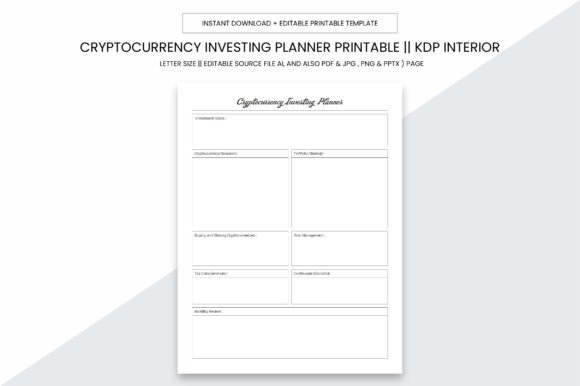
Many people assume any lined notebook or generic spreadsheet will do—until they realize how quickly notes scatter across apps, screenshots pile up untagged, and tax season arrives with mismatched records. The Cryptocurrency Investing Planner solves that by offering structure without rigidity: pre-formatted pages for trade logs, wallet balances, exchange fees, risk assessments, and even emotional check-ins before major moves. It’s built for real behavior—not theoretical perfection.
Its practical 8.5 x 11 inch size fits standard binders and printers. There’s no bleed—so nothing gets cut off when printed locally. And because it comes as a high-resolution (300 ppi) digital download—including editable Adobe Illustrator (.ai), PDF, JPG, PNG, and PowerPoint (.pptx) files—you retain full flexibility: annotate digitally, print selectively, or adapt layouts for your workflow.
Common Oversights—and How They Cost You
Mistake #1: Assuming “printable” means “ready for KDP.”
Not all planners are formatted for Kindle Direct Publishing. Some lack proper margins, have inconsistent page counts, or include low-res graphics that blur on press. This one includes exactly 109 interior pages in print-ready PDF format—fully compliant with KDP’s requirements for bleed-free, CMYK-safe, 300 ppi interiors. That means fewer rejections, faster publishing, and professional-looking results—even if you’re new to self-publishing.
Mistake #2: Downloading only PDFs and missing editable source files.
If you want to add your logo, adjust colors for branding, or translate sections for a global audience, locked PDFs won’t cut it. With the included .ai file (plus PPTX), you can modify fonts, rearrange layouts, or localize content—no design skills required. One freelance educator added her course syllabus headers to the reflection pages; a crypto newsletter creator embedded QR codes linking to weekly market recaps.
Mistake #3: Overlooking physical usability.
A planner that looks great online may fail in practice: thin paper ghosts through, narrow margins cramp handwriting, or tight binding prevents flat opening. This version uses generous line spacing, wide margins, and clean typography—all optimized for both digital annotation and high-quality home or local print. Test prints at Staples or FedEx show crisp text and sharp charts, not pixelated graphs or faded headers.
What to Verify Before You Use or Resell It
Before printing or uploading to KDP, take two minutes to confirm:
- Your printer settings are set to “Actual Size” (not “Fit” or “Shrink to Fit”). Scaling distorts spacing and misaligns checkboxes.
- You’ve opened the PDF in Adobe Acrobat—not a browser preview. Browsers often render fonts inconsistently or drop embedded layers.
- You’ve checked the first and last pages for correct page numbering and header alignment. KDP requires consistent pagination; this planner delivers sequential, non-repeating numbers throughout.
- You’ve reviewed the color mode. While RGB works fine for screen use, commercial printers prefer CMYK. The provided PDF is already prepped for both—but if editing the .ai file, double-check color profiles before final export.
Real-World Uses Beyond Personal Tracking
This isn’t only for solo investors. Small business owners use it to document crypto payroll experiments. Educators integrate it into fintech courses—assigning students to log simulated trades and analyze behavioral patterns. Freelance analysts repurpose the portfolio review spreadsheets into client reporting templates. One SaaS founder bundled the planner with his crypto tax automation tool—customers loved having a companion for manual reconciliation steps.
For creators building digital products, the editable source files mean you can white-label it fast: swap cover art, insert your brand palette, add a resource page with your favorite tools (e.g., CoinGecko API tips or Ledger hardware setup checklists), and launch a niche version—like “Crypto Investing Planner for Staking Rewards” or “Beginner-Friendly Bitcoin Tracker.”
Avoiding the “Set-and-Forget” Trap
A planner only works if it supports *how you actually think and act*. Don’t force yourself into rigid daily entries if your strategy involves quarterly rebalancing. Instead, use the flexible monthly summary pages to capture trends—not just prices, but what you learned, what surprised you, and where your assumptions were off. One user discovered she consistently overestimated volatility after three months of honest journaling—leading her to adjust position sizing, not just stop-loss levels.
Similarly, don’t skip the “Emotional Temperature” section—even if it feels vague at first. Noting whether you bought during FOMO or sold in panic creates a feedback loop no algorithm provides. Over time, those notes reveal patterns more valuable than candlestick charts.
Final Thought: Clarity Starts With the Right Container
The Cryptocurrency Investing Planner doesn’t promise higher returns. What it does offer is something quieter but essential: reduced friction between intention and action. When your records are organized, your reflections are captured, and your process is repeatable—you spend less time recovering lost data and more time refining strategy.
It’s designed for people who know crypto moves fast—but also know that sustainable progress happens slowly, deliberately, and on paper (or screen) that respects their time and attention. Whether you’re preparing your first KDP upload, guiding clients through volatile markets, or simply trying to remember why you bought that obscure token in 2021—this planner meets you where you are. No fluff. No filler. Just space, structure, and smart defaults.