Dot Grid KDP Interior Template: A Practical, Print-Ready Tool for Planners, Journalers & Self-Publishers
If you've ever spent hours formatting a planner page—only to discover it doesn’t align with Amazon KDP’s print requirements—you’re not alone. The Dot Grid KDP Interior Template solves that exact problem. It’s not just another printable PDF—it’s a rigorously tested, production-ready interior layout designed specifically for creators who value precision, flexibility, and speed.
What Is the Dot Grid KDP Interior Template—Really?
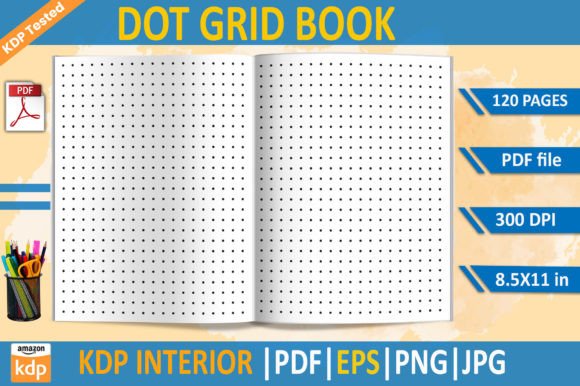
At its core, the Dot Grid KDP Interior Template is a 120-page, 8.5×11-inch interior file package built for Kindle Direct Publishing. Unlike generic dot grid downloads, this version has been validated through real-world KDP uploads—no last-minute reformatting, no bleed-related surprises, no pixelated edges. It arrives as a complete toolkit: a print-optimized PDF, an editable EPS vector file, a transparent-background PNG, and a high-resolution JPG—all at 300 DPI.
“KDP tested” isn’t marketing fluff here. It means every margin, gutter, and spacing rule complies with Amazon’s current print specifications—including the critical “no bleed” configuration required for standard trim sizes. That translates directly to fewer upload errors, faster approval, and zero wasted time troubleshooting in the KDP dashboard.
Who Benefits Most From This Template?
The Dot Grid KDP Interior Template serves a surprisingly wide range of users—not just planners or bullet journal enthusiasts, but also educators, coaches, small business owners, and indie authors building companion workbooks.
- Planner & Journal Designers: Launch custom undated planners, habit trackers, or reflection journals without rebuilding grids from scratch.
- Educators & Trainers: Create printable worksheets, guided note-taking pages, or visual thinking templates for students or clients.
- Coaches & Consultants: Package session prep tools, goal-setting frameworks, or accountability check-ins as polished, branded printables.
- Self-Publishing Authors: Add interactive interiors to nonfiction books—like strategy workbooks, journal prompts, or creative exercises—without compromising on print quality.
Even if you don’t plan to publish on Amazon, the template’s clean, neutral dot grid (subtle 5mm spacing, light gray dots) works beautifully as a foundation for digital note-taking apps, Canva projects, or laser-printed personal use.
Key Features—Explained Without Jargon
Let’s break down what’s included—and why each file type matters in practice:
✅ Print-Optimized PDF (120 Pages)
This is your go-to file for immediate KDP upload. It’s pre-formatted with correct margins (0.25" minimum), proper spine alignment for perfect-bound books, and embedded fonts to prevent rendering issues. No need to open it in design software—just download, name your book, and upload.
✅ Editable EPS File
For designers using Adobe Illustrator or Affinity Designer: this vector file lets you adjust dot size, spacing, color, or add custom headers, footers, or branding elements. Because it’s vector-based, scaling won’t degrade quality—even if you expand the grid to fit a larger format later.
✅ Transparent PNG & High-Res JPG
These are ideal for hybrid workflows. Drop the PNG into Canva, PowerPoint, or Notion to build digital-first versions. Use the JPG for social media previews, product mockups, or email newsletters—crisp at any standard web size.
Real-World Use Cases—Beyond the Obvious
Here’s where the Dot Grid KDP Interior Template shines in unexpected ways:
- A therapist created a 6-week anxiety workbook—using the dot grid as a base for drawing exercises, thought records, and progress charts. She added minimal text overlays in Canva, exported to PDF, and published in under 48 hours.
- A freelance writer bundled her productivity course with a printable planner. Instead of paying a designer $300+, she customized the EPS file with her logo and signature color palette—then uploaded both digital and print versions simultaneously.
- A homeschool parent compiled weekly lesson logs, combining the dot grid with handwritten notes and printed them as a keepsake binder. The 300 DPI resolution ensured legibility even when scanned back into digital archives.
Notice the pattern? This isn’t about flashy design—it’s about removing friction. The template handles the technical heavy lifting so you can focus on content, voice, and purpose.
Strengths—And Honest Considerations
Strengths:
- Time saved: Eliminates hours of trial-and-error with KDP’s margin checker.
- Consistency: Every page shares identical grid density and alignment—critical for professional-looking interiors.
- Adaptability: Works equally well for lined, blank, or hybrid layouts (just hide or layer elements).
- No subscription, no login: One-time download. No watermarks. No usage limits.
Considerations to Keep in Mind:
- This is an interior-only template—covers, titles, and marketing copy aren’t included. You’ll still need to design those separately (or use KDP’s cover creator).
- The grid is intentionally minimal. If you need heavy borders, icons, or decorative elements, the EPS file gives you full control—but basic editing skills help.
- While compatible with most KDP paperback options, always double-check trim size requirements if planning a hardcover or special edition.
How to Evaluate If It Fits Your Project
Ask yourself these three questions before downloading:
- Do I need a reliable, no-surprises starting point for a printed dot grid interior? If yes—and especially if you’ve faced KDP rejection for margin or bleed issues—the Dot Grid KDP Interior Template delivers immediate peace of mind.
- Am I comfortable making light edits—or do I prefer plug-and-play simplicity? The PDF requires zero editing; the EPS invites customization. Choose based on your confidence level and project goals.
- Is consistency across 100+ pages important to my audience? Students, clients, or readers using your planner or workbook rely on predictable spacing and alignment. This template guarantees it.
If two or more answers are “yes,” it’s likely a strong match—even if you’re new to self-publishing.
Final Thought: Tools Should Serve Your Vision—Not Define It
A great template doesn’t replace creativity—it clears space for it. The Dot Grid KDP Interior Template doesn’t tell you what to write, how to teach, or who to serve. Instead, it quietly handles the invisible work: precise spacing, print compliance, cross-platform usability, and scalability. Whether you're launching your first journal on Amazon or printing 20 copies for a workshop, it meets you where you are—with zero assumptions and total reliability.
When your goal is clarity, consistency, and confidence—not complexity—the right foundation makes all the difference. And sometimes, that foundation looks like 120 pages of perfectly spaced, KDP-tested dots.