Learning to Trace Activity Book for Kid
For educators designing early literacy curricula, parents supporting at-home skill development, or small publishers building printable educational resources, the Learning to Trace Activity Book for Kid functions as a precision tool—not just a collection of pages, but a structured, production-ready asset designed for real-world implementation. It bridges foundational motor skill development with scalable content creation, fitting cleanly into workflows where consistency, quality control, and adaptability matter.
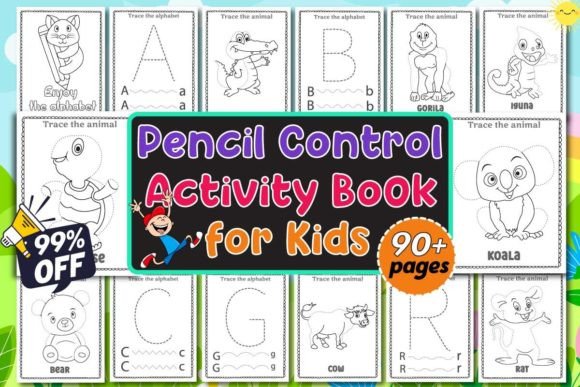
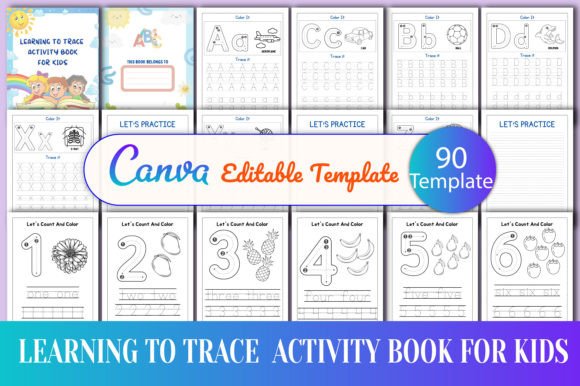
This 90-page activity book is built around four core functional modules: A–Z uppercase and lowercase tracing pages, 0–9 count-and-color number practice, high-frequency tracing drills (lines, curves, shapes, letters), and administrative scaffolding (intro page, “Belongs to” ownership label). Each page is pre-formatted to CMYK, 8.5×11 inches, 300 DPI, no bleed—meaning it’s press-ready out of the box, whether you’re printing locally, uploading to a print-on-demand service, or distributing digitally.
How It Fits Into Your Workflow
The value isn’t in isolation—it’s in integration. You don’t start with the activity book and build *around* it. Instead, you anchor it inside an existing process: lesson planning, product development, client deliverables, or curriculum packaging. For example:
- Educators use the editable Canva template to customize letter order, add school branding, or insert phonics cues before exporting PDFs for classroom handouts—cutting prep time by 60–70% compared to designing from scratch.
- Freelance designers or content creators embed the tracing pages into larger learning kits (e.g., “Alphabet + Phonics + Fine Motor Bundle”) without redrawing assets—maintaining visual continuity while focusing energy on sequencing and pedagogical flow.
- Small publishers import the high-res PNGs directly into layout software like InDesign or Affinity Publisher, layering them with instructional text or QR-linked audio guides—no re-rasterization, no quality loss.
Because the files include both editable (Canva) and static (PDF/JPEG/PNG) versions, version control stays simple. You make structural changes once—in Canva—then export fresh assets for each use case: low-file-size JPEGs for email campaigns, print-optimized PDFs for bulk orders, transparent PNGs for web overlays or LMS uploads.
Preparation Is Built-In—Not Added On
Unlike generic tracing worksheets that require manual alignment, color correction, or font substitution, this resource ships with production fundamentals already resolved. The CMYK color profile ensures accurate ink coverage across printers. The 300 DPI resolution prevents pixelation even when pages are enlarged for projector-based instruction. And the absence of bleed eliminates trimming guesswork during physical printing.
That means your preparation phase shifts from technical troubleshooting to pedagogical intention. Instead of adjusting kerning on “A” and “a”, you decide whether to introduce lowercase first (as research suggests for early writing fluency), or pair each letter with its corresponding sound icon. Instead of fixing jagged edges on number outlines, you focus on pacing: how many tracing repetitions per session? Which letters benefit from tactile reinforcement (e.g., tracing over sandpaper cutouts)?
Compatibility That Doesn’t Require Workarounds
The Learning to Trace Activity Book for Kid avoids platform lock-in. The Canva template works in any modern browser—no desktop app required—and exports cleanly to industry-standard formats. If your team uses Google Workspace, you can share the Canva link directly; if you rely on Adobe Creative Cloud, drag the PNGs into Illustrator for vector enhancement or Photoshop for texture overlays.
It also interoperates with common teaching tools. Pages align with standard kindergarten scope-and-sequence documents (e.g., Common Core ELA Foundational Skills K.L.1.a–d). The count-and-color section supports early math benchmarks around one-to-one correspondence and numeral recognition. Even the “Belongs to” page serves dual purposes: as a student ownership prompt *and* as a metadata placeholder for digital asset management systems used by schools or tutoring platforms.
Usability Without Compromise
Every tracing path follows evidence-informed design principles: stroke width is optimized for pencil control (not too thin to break, not too thick to obscure form); letter proportions match D’Nealian or Zaner-Bloser models depending on regional preference; number forms avoid ambiguous glyphs (e.g., “1” with base, “4” with closed top). There’s no decorative clutter competing for attention—just clear, intentional paths.
That clarity extends to file organization. The package delivers exactly what’s listed: no upsells, no missing pages, no “bonus” content that dilutes focus. You receive 90 pages—structured, named, and logically sequenced. If you need to extract only the uppercase A–Z set for a targeted intervention, it’s one click—not a hunt through unlabelled folders.
Efficiency That Scales With Your Output
When you’re producing multiple learning products—say, a summer readiness pack, a bilingual tracing supplement, or a dyslexia-friendly version—the ability to reuse, recombine, and repurpose becomes critical. Because all tracing elements are vector-aligned in Canva (or cleanly rasterized at high resolution), you can:
- Duplicate and modify letter pages to emphasize directional arrows for left-to-right tracking;
- Swap background colors in Canva to support visual stress reduction for neurodiverse learners;
- Isolate number outlines and reimport them into interactive apps using SVG conversion tools.
No reverse-engineering. No recreating strokes from screenshots. Just direct, editable access to the underlying design logic.
Consistency Across Formats and Time
Long-term usability depends on format stability. JPEGs degrade with repeated saves; low-DPI PDFs blur on retina displays; untagged PNGs lack accessibility metadata. This package avoids those pitfalls. The PDFs are tagged for screen readers (with proper reading order and alt-text placeholders). The PNGs retain transparency for layered digital use. And because the Canva source remains editable, updates—like adding inclusive names to the “Belongs to” page or updating copyright year—take under two minutes.
That consistency compounds. One educator using the book across three academic years doesn’t face version drift. A blogger releasing monthly “printable packs” maintains brand cohesion because the tracing style, spacing, and visual hierarchy stay identical—no accidental redesigns between downloads.
Quality Control Starts With the Source File
You don’t QA 90 pages individually when the foundation is built for reliability. The A–Z tracing pages follow uniform baseline alignment. Number sizing scales proportionally across 0–9. Stroke weight remains constant within each category (letters vs. numbers vs. shapes). Even the “Belongs to” page includes subtle margin guides so handwritten names stay legible and centered.
This level of detail reduces post-export fixes. When you generate a PDF for a client, you’re not checking every “g” descender—you’re verifying branding placement and file naming convention. That shift—from micro-correction to macro-verification—is where real time savings emerge.
Practical Integration Tips
Start narrow. Pick one use case: maybe you’ll add the uppercase A–Z pages to your existing alphabet flashcards, or drop the count-and-color sheets into a parent newsletter as a “take-home activity.” Test it with your intended audience—students, clients, or customers—before scaling.
Keep your Canva link bookmarked, not buried. Rename it clearly (“TraceBook_Source_Editable”) so it surfaces fast during deadlines. Export static files only when needed: JPEG for social previews, PDF for printing, PNG when transparency matters.
Finally, treat the “Belongs to” page as more than a label. Use it as a lightweight data capture point—if distributing digitally, ask families to snap a photo of the filled-out page and return it. That gives you real usage signals (who’s engaging, how they’re personalizing it) without surveys or logins.
The Learning to Trace Activity Book for Kid doesn’t replace pedagogy, design judgment, or teaching presence. It replaces friction. It turns setup time into strategy time—and lets you spend energy where it matters most: guiding, adapting, and responding to learners, not wrestling with file settings.